Webhooks
Connect Pricely to Zapier, Make or your own code. Pricely sends a signed JSON POST to your URL when key events happen, and retries if your endpoint is briefly down.
A webhook is a URL Pricely calls when something happens in your workspace. Point it at a Zapier or Make scenario to update a CRM, post in a chat channel or add a row to a spreadsheet, or at your own server. Every request is signed, so your code can prove it came from Pricely.
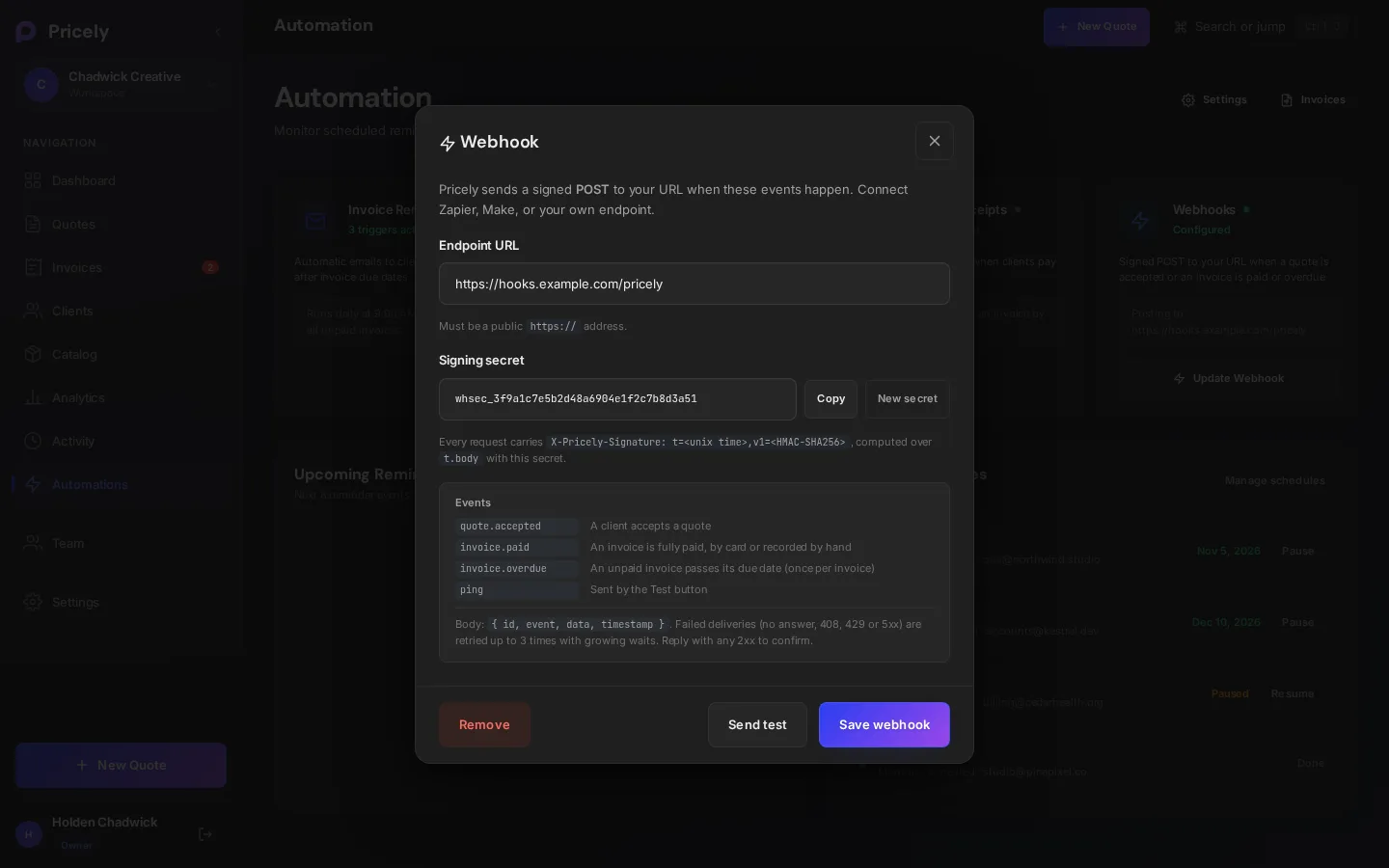
Set up a webhook
- Open Automation
Choose Automations in the sidebar and find the Webhooks card.
- Add your endpoint
Click Configure Webhook and paste your Endpoint URL, for example a Zapier Catch Hook URL or a Make Custom webhook URL. It must be a public
https://address. - Copy the signing secret
The dialog shows a Signing secret that starts with
whsec_. Click Copy and store it with your endpoint's configuration. You'll need it to verify signatures. - Send a test
Click Send test. Pricely sends a signed
pingevent and shows what your endpoint answered, for example Delivered. Your endpoint answered 200. - Save
Click Save webhook. The card then shows the URL it posts to, and the button reads Update Webhook.
Each workspace has one webhook URL. To change it, open the same dialog and save a new URL. To stop sending events, click Remove.
Events
| Event | Sent when |
|---|---|
quote.accepted | A quote becomes accepted: the client signs it on the quote link, or someone on your team uses Accept in the app. |
invoice.paid | An invoice is paid in full by any route: a card payment through Stripe, a payment you record yourself, Mark Fully Paid, a bulk action or a credit note that clears the balance. |
invoice.overdue | An unpaid invoice passes its due date. It's sent once per invoice, by the daily check at 07:00 UTC. |
ping | You click Send test. |
Invoices that are created already paid, for example by an import, don't send invoice.paid. A partial payment doesn't send it either; the event fires when the balance reaches zero.
Request format
Every event is a POST with a JSON body and these headers:
| Header | Value |
|---|---|
Content-Type | application/json |
User-Agent | Pricely-Webhooks/1.0 |
X-Pricely-Event | The event name, for example invoice.paid. |
X-Pricely-Delivery | A unique ID for this delivery, such as evt_3f9a…. Retries keep the same ID. |
X-Pricely-Signature | t=<unix seconds>,v1=<hex HMAC-SHA256>. See Verify signatures. |
The body always has the same four keys: id (the delivery ID, the same as X-Pricely-Delivery), event, data and timestamp.
POST /pricely-webhook HTTP/1.1
Content-Type: application/json
User-Agent: Pricely-Webhooks/1.0
X-Pricely-Event: invoice.paid
X-Pricely-Delivery: evt_3f9a6c0e1b7d4a52a8e2f1c9d0b4e7a6
X-Pricely-Signature: t=1793372645,v1=5d1c0f…{
"id": "evt_3f9a6c0e1b7d4a52a8e2f1c9d0b4e7a6",
"event": "quote.accepted",
"data": {
"id": "q_8f2c1a",
"number": "QT-0042",
"clientId": "c_71b0d2",
"clientName": "Northwind Studio",
"clientEmail": "ops@example.com",
"total": 4800,
"currency": "USD",
"acceptedAt": "2026-10-30T15:04:05.000Z"
},
"timestamp": "2026-10-30T15:04:05.120Z"
}{
"id": "evt_9b2e4d7a0c5f4e1b9a3d6c8e2f7a1b40",
"event": "invoice.paid",
"data": {
"id": "inv_51c9e0",
"number": "INV-0042",
"clientId": "c_71b0d2",
"clientName": "Northwind Studio",
"clientEmail": "ops@example.com",
"total": 4800,
"amountPaid": 4800,
"balanceDue": 0,
"currency": "USD",
"dueDate": "2026-11-13T12:00:00.000Z",
"paidAt": "2026-10-30T15:04:05.000Z"
},
"timestamp": "2026-10-30T15:04:05.120Z"
}invoice.overdue carries the same data fields as invoice.paid, with the amount still owed in balanceDue and paidAt set to null.
| Field | Type | Notes |
|---|---|---|
id | string | The quote or invoice ID in Pricely. |
number | string | The document number your client sees. |
clientId, clientName, clientEmail | string | Empty strings when the document has no linked client or the client has no email. |
total, amountPaid, balanceDue | number | Amounts in major units, for example 4800 for $4,800.00. |
currency | string | The document's three-letter currency code. |
acceptedAt, dueDate, paidAt, timestamp | string or null | ISO 8601 times in UTC. |
The test event uses the same headers and signature. Its body looks like this:
{
  "id": "evt_0c4d2a9e7f1b4c3d8e6a5b2f9d1c7e30",
  "event": "ping",
  "data": {
    "message": "Test event from Pricely",
    "orgId": "org_2f81c4"
  },
  "timestamp": "2026-10-30T15:04:05.000Z"
}
Verify signatures
Check the signature before you trust a request. X-Pricely-Signature has two parts: t, the Unix time in seconds when the request was signed, and v1, a hex HMAC-SHA256 of the string t + . + the raw request body, keyed with your signing secret.
- Read the raw body
Use the exact bytes you received. Parsing the JSON and serializing it again changes the bytes and breaks the signature.
- Split the header
Split on commas, then split each part on its first
=to gettandv1. - Recompute the HMAC
Compute HMAC-SHA256 of
t.bodywith yourwhsec_…secret and compare it withv1using a constant-time comparison. - Check the time
Reject requests where
tis more than five minutes from your server's clock. This stops old requests from being replayed.
import crypto from "node:crypto";
import express from "express";

const app = express();
const SECRET = process.env.PRICELY_WEBHOOK_SECRET; // whsec_…
const TOLERANCE_SECONDS = 300;

function verifyPricelySignature(header, rawBody, secret) {
  const parts = {};
  for (const piece of String(header || "").split(",")) {
    const i = piece.indexOf("=");
    if (i > 0) parts[piece.slice(0, i).trim()] = piece.slice(i + 1).trim();
  }
  const t = Number(parts.t);
  if (!Number.isFinite(t) || !parts.v1) return false;
  if (Math.abs(Date.now() / 1000 - t) > TOLERANCE_SECONDS) return false;

  const expected = crypto
    .createHmac("sha256", secret)
    .update(`${parts.t}.${rawBody}`)
    .digest();
  const given = Buffer.from(parts.v1, "hex");
  return given.length === expected.length && crypto.timingSafeEqual(expected, given);
}

// express.raw keeps the exact bytes Pricely signed.
app.post("/pricely-webhook", express.raw({ type: "application/json" }), (req, res) => {
  const rawBody = req.body.toString("utf8");
  if (!verifyPricelySignature(req.get("X-Pricely-Signature"), rawBody, SECRET)) {
    return res.status(400).send("Invalid signature");
  }
  const delivery = JSON.parse(rawBody);
  res.sendStatus(200); // answer first, then do the work

  // Skip delivery.id if you've already handled it (retries reuse it).
  if (delivery.event === "invoice.paid") {
    console.log(`${delivery.data.number} paid: ${delivery.data.amountPaid} ${delivery.data.currency}`);
  }
});

app.listen(3000);import hashlib
import hmac
import time
TOLERANCE_SECONDS = 300
def verify_pricely_signature(header: str, raw_body: bytes, secret: str) -> bool:
parts = {}
for piece in (header or "").split(","):
key, sep, value = piece.partition("=")
if sep:
parts[key.strip()] = value.strip()
try:
t = int(parts["t"])
except (KeyError, ValueError):
return False
if abs(time.time() - t) > TOLERANCE_SECONDS or "v1" not in parts:
return False
signed = parts["t"].encode() + b"." + raw_body
expected = hmac.new(secret.encode(), signed, hashlib.sha256).hexdigest()
return hmac.compare_digest(expected, parts["v1"])
# Flask: verify_pricely_signature(request.headers.get("X-Pricely-Signature"),
# request.get_data(), SECRET)Delivery and retries
- HTTPS only. Pricely only delivers to public
https://URLs. Local and private network addresses, such aslocalhost,*.localor192.168.x.x, are blocked. - No redirects. If your URL redirects somewhere else, the delivery fails. Use the final URL.
- Answer with a 2xx within 10 seconds. Any
2xxstatus confirms receipt. Respond first and do slow work afterwards. - Automatic retries. Pricely makes up to three attempts in total, waiting 1 second and then 2 seconds between them. Each attempt is signed again with a fresh
t.
| Your endpoint… | What Pricely does |
|---|---|
Answers 2xx | Delivered. No retry. |
| Can't be reached, or takes longer than 10 seconds | Retries. |
Answers 408, 429 or 5xx | Retries. |
Answers any other 4xx, such as 400 or 401 | Stops. The failure is final. |
The Send test button makes a single attempt with no retries, so you see the result straight away. The dialog also shows the Last delivery: the event, whether it was delivered or failed, the status code, when it happened and how many attempts it took.
Troubleshooting
| Problem | What to check |
|---|---|
| Use a public https:// URL. Local and private network addresses are blocked. | The URL points at your own machine or a private network. Use a public HTTPS URL, or a tunnel that gives you one. |
| Your endpoint answered 401. (or another code) | Pricely reached your endpoint, but it refused the request. Anything outside 200–299 counts as a failure. Check your endpoint's logs. |
| Could not reach the endpoint: No response within 10s | Your endpoint is too slow. Answer with a 2xx first, then do the work. |
| Could not reach the endpoint (any other reason) | The host didn't answer, its TLS certificate isn't valid, or the URL redirects. Check the URL opens in a browser and is its final address. |
| The signature doesn't match | Verify against the raw body, not re-serialized JSON, and use the secret currently shown in the dialog. If you clicked New secret, save the webhook and update your endpoint. |
No X-Pricely-Signature header | The webhook was saved without a secret. Open the dialog and click Save webhook to store one. |
| The same event arrived twice | A retry after a timeout or a 5xx. De-duplicate on X-Pricely-Delivery. |
No invoice.overdue for an old invoice | Expected. The event is sent once, when the invoice first passes its due date, not for invoices that were already overdue before. |
Plans
Webhooks are included on Business and Enterprise. On other plans the Webhooks card shows a lock badge and an upgrade link.